macOS
Platform
Apple Silicon (ARM64)
DOWNLOADS · macOS
The DMP NEXUS VIRTUAL APPLIANCE brings the full sender side — DMP NEXUS CORE and DMP NEXUS PLAYER, preconfigured on Debian 13 (Trixie) — to your Mac in an UTM image. On Apple Silicon it runs natively on ARM64, with no emulation layer.
DOWNLOAD
v0.0.1
Apple Silicon (ARM64)
WHY A VM
macOS CoreAudio offers no end-to-end native DSD support. Rather than wait for it, the DMP NEXUS VIRTUAL APPLIANCE solves it structurally: it carries a complete, PipeWire-based Linux audio subsystem — running directly on your Mac's ARM64 architecture, with no emulation layer. Your audio files are seamlessly available in the VIRTUAL APPLIANCE — no copying, no synchronization.
That yields the full bit-perfect chain up to DSD512 and PCM 384/24 in stereo — from the player to the DMP ONE. A real solution: this is the very appliance we run as our live demo.
WHAT'S INSIDE
01 · PRECONFIGURED
A complete Linux sender stack with DMP NEXUS CORE and DMP NEXUS PLAYER already configured. Import the image, start it, stream. Runs on Debian 13 (Trixie) with an XFCE desktop environment.
02 · NATIVE (ARM64)
The Virtual Appliance uses your Mac's ARM64 architecture directly — no emulation layer. That keeps resource use low and the stream stable.
03 · FILE ACCESS
The PLAYER reads the audio files stored locally on your Mac directly. No redundant storage inside the VM, no second library to maintain.
04 · LOCAL DAC
Beyond network streaming to the DMP ONE, the PLAYER also outputs DSD and PCM directly to a USB DAC connected to the Mac — over USB passthrough.
05 · VERIFIABLE
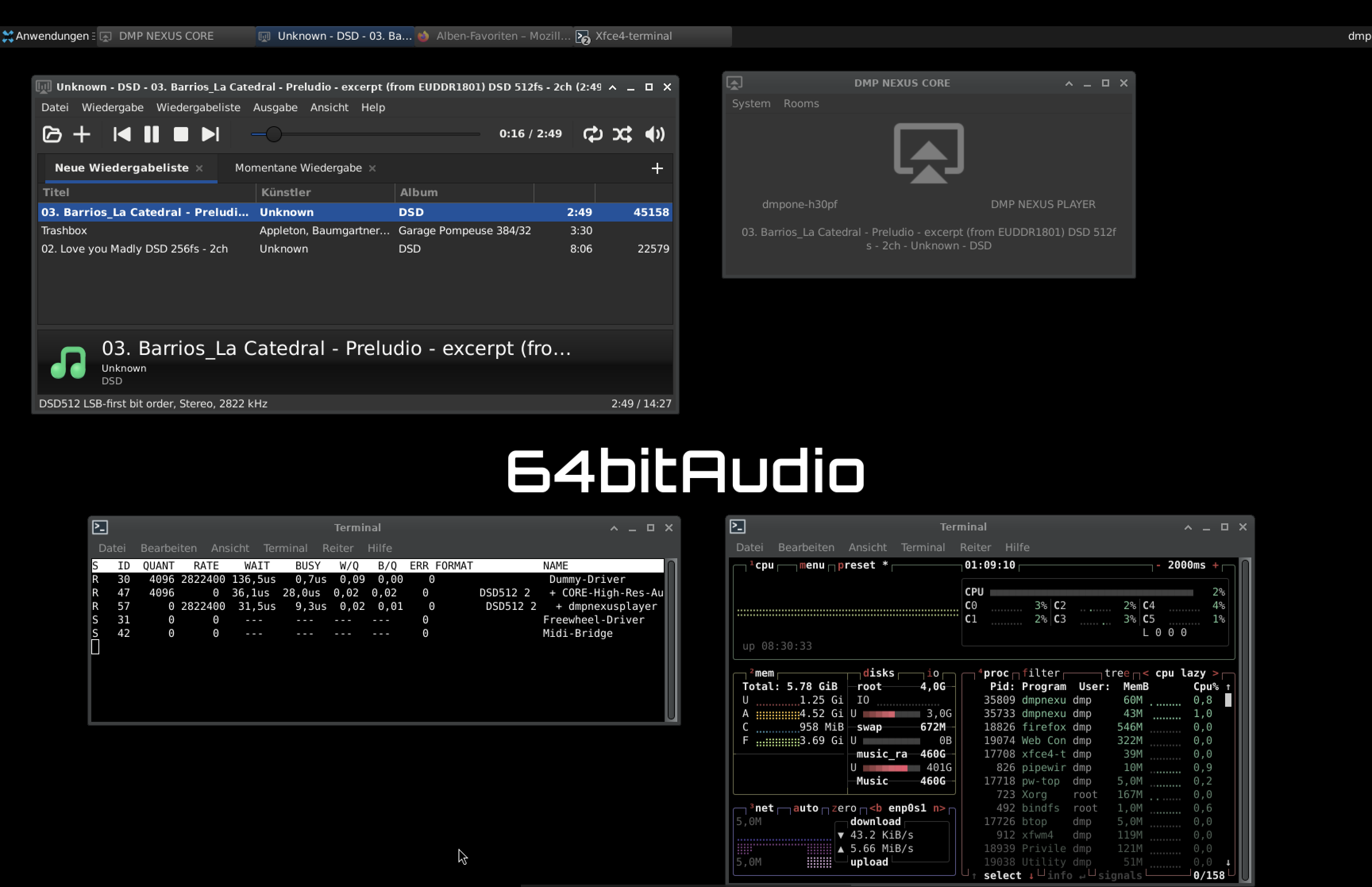
Inside the VM, pw-top shows the sample rate, format, and stability of every active stream in real time; btop shows CPU, memory, and network.
06 · TESTED
Tested on a MacBook Pro with Apple M4 Pro at moderate resource use. A DSD512 stereo stream sits around 45 Mbit/s — even bit-perfect streaming from the Qobuz web player in Firefox runs stably.
07 · EXTENSIBLE
The appliance is yours, not a locked-down box. Sign in with full privileges (user: dmp, password: nexus) to install extra packages, adjust services, and shape the environment to fit your setup.
IN UTM
The real audio path: from sender to sink, all inside a VM on the Mac, verifiable in real time.
SPECIFICATIONS